The better alternative to Presentations AI for creating presentations.
If you are searching for the best AI presentation maker, you have likely encountered Presentations AI. It now supports richer document, URL, branding, and native PowerPoint workflows, but it is still primarily optimized around presentation decks. Discover why InfoBlog is rapidly becoming the stronger choice for creators who want to transform URLs, long-form articles, and PDFs into both presentations and LinkedIn carousels.

Sources and related context
AI presentation tools change quickly. These comparison pages now link to the official product pages used for feature checks, plus InfoBlog guides that explain URL-to-deck, PDF-to-deck, and carousel repurposing workflows in more depth.
Official sources
Related reading
Why switch to InfoBlog from Presentations AI?
Three critical reasons professionals, agencies, and marketers are upgrading their presentation workflow.

InfoBlog vs Presentations AI, side by side
See exactly how the two stack up, feature by feature.
| Feature | | |
|---|---|---|
| AI-Powered Presentation Generation | ||
| Automated Carousel Generation | ||
| Multiple Social Media Aspect Ratios | ||
| Import Content directly from URL / Link | URL, PDF, Word | |
| High-Fidelity Export to Microsoft PPTX | ||
| Design Experience Needed | ||
| Canvas Editing Flexibility | Unrestricted drag & drop | Locked rigid layouts |
Winner: InfoBlog
Which software is easiest to use?
Presentations AI requires you to navigate a fairly rigid, corporate-focused onboarding process and menu system before you can even begin generating your slide deck. InfoBlog completely strips all of that friction away. We believe in a zero-learning-curve experience: just paste a YouTube URL, a blog post link, or a text prompt, and the AI handles the entire structural heavy lifting instantly. You can go from a blank screen to a fully formatted, beautifully designed presentation in under 60 seconds without ever watching a tutorial.
Creating with InfoBlog
InfoBlog follows a clear, step-by-step guide. There is little to no learning curve — even a first-time user can create a polished presentation.
Creating with Presentations AI
Presentations AI gets the job done but forces you into specific layout rules or standard themes, requiring more time to tweak and adjust.
Winner: InfoBlog
Which software has the best designs?
While Presentations AI forces your hard-earned content into standard, somewhat dated corporate templates that often require manual resizing, InfoBlog utilizes next-generation Smart Templates. These intelligent layouts dynamically adapt to the exact length of your text, automatically resizing fonts and perfectly balancing white space. This ensures your slides and carousels always look professionally designed by a senior graphic designer, completely eliminating the need for frustrating manual tweaking and alignment.
| Feature | | |
|---|---|---|
| Variety of modern design themes | Extensive & Dynamic | Corporate & Rigid |
| Smart Templates (Auto-scaling text) | Yes | No |
| Professional brand aesthetics | Premium, High-Converting | Basic, Standard Corporate |
| Total number of layout templates | 18+ Normal + Smart Layouts | Limited standard library |
InfoBlog Smart Templates
InfoBlog's Smart Templates intelligently adapt to the exact length and context of your content, meaning less time adjusting layouts and more time publishing.
22+ Premium Natural Templates
In addition to AI-driven Smart Templates, InfoBlog offers a growing library of 22+ highly-customizable natural templates for every usecase.
Presentations AI themes
Presentations AI relies heavily on predefined template palettes. While you can often change colors quickly, the underlying layout structures can be more rigid and less adaptive to complex content.
Winner: InfoBlog
Which platform is best for creating presentations with AI?
Presentations AI treats artificial intelligence primarily as a simple text-expander for bullet points on slides. InfoBlog, on the other hand, treats AI as a comprehensive, multi-channel content repurposing engine. Whether you want to turn a comprehensive 3,000-word SEO blog post into a digestible keynote presentation, or condense a podcast transcript into a viral 10-slide LinkedIn carousel, InfoBlog’s AI extracts the core narrative arc perfectly and structures it for maximum audience engagement.
| Feature | | |
|---|---|---|
| Instantly Convert URL to Presentation Deck | Yes | Yes |
| Multi-format simultaneous generation | Yes | No |
| Dynamic Content Scaling & Summarization | Yes | No |
How it works with InfoBlog
Paste your link or document
Simply paste a blog URL, YouTube link, or upload a document directly into the engine.

AI Repurposes Content
Our engine extracts the key narrative and automatically restructures it into presentation slides or social carousels.

Publish or Export
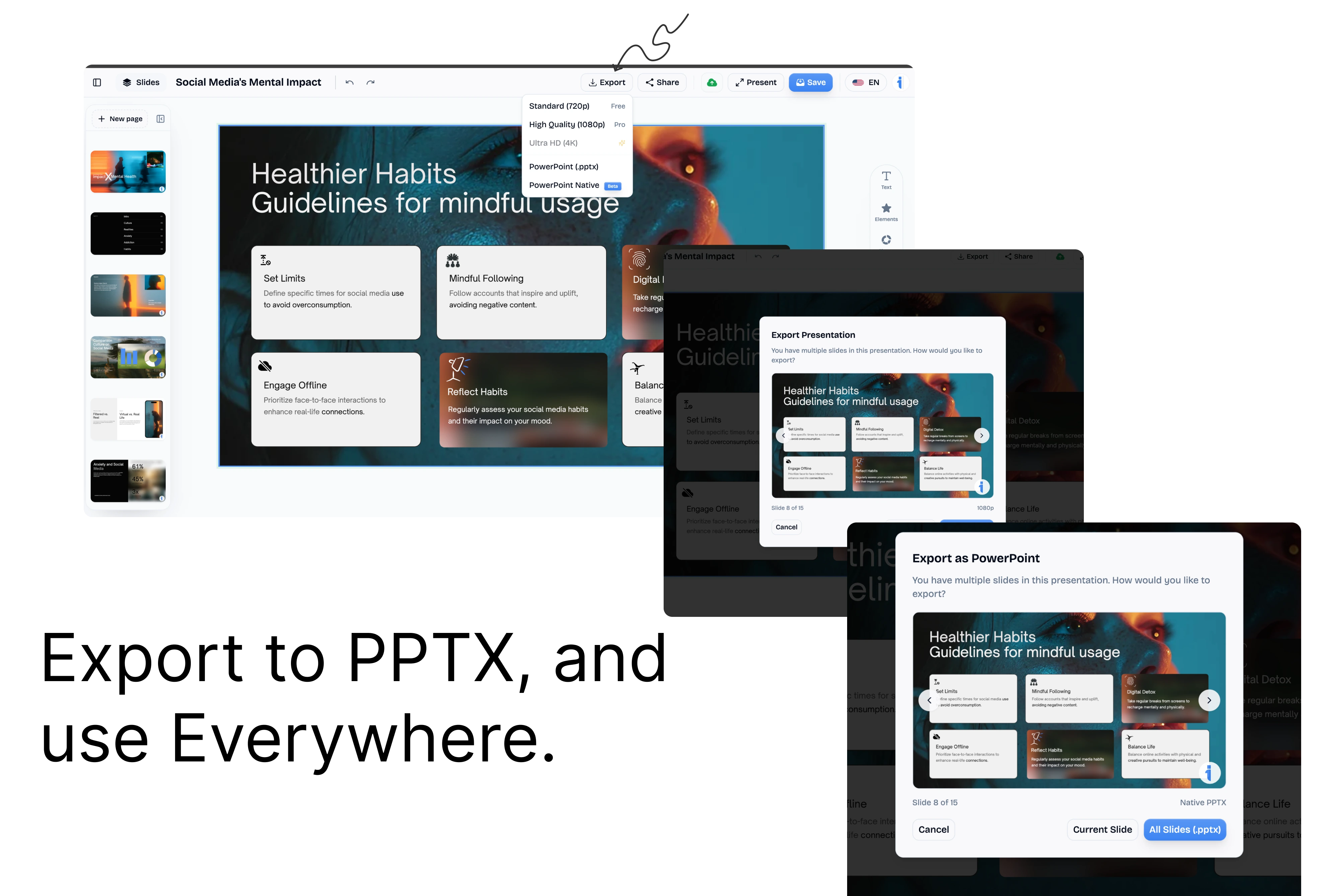
Preview your deck, apply a custom template, and export it as PDF, PPTX, or share it online.
The final verdict: Presentations AI might suffice if you only need to create internal company updates or standard quarterly reports. However, it is severely limited by its lack of social media formats and rigid template engine. InfoBlog offers a truly flexible creative canvas, gorgeous dynamic Smart Templates, and unmatched AI-driven content repurposing capabilities. The ability to instantly generate multi-format visual assets from any source link makes InfoBlog the undisputed winner for modern professionals.
Frequently Asked Questions
Is InfoBlog a better AI presentation generator than Presentations AI?
InfoBlog is a better fit when you need content repurposing across formats. Presentations AI is strong for deck generation and native PowerPoint export, while InfoBlog focuses on turning URLs and documents into both presentation decks and social carousels.
Can I export my AI-generated presentations to PowerPoint (PPTX)?
Absolutely. Both InfoBlog and Presentations AI allow you to securely export your generated slide decks to standard Microsoft PowerPoint (PPTX) format for offline editing, sharing with corporate clients, or presenting without an internet connection.
Does Presentations AI support LinkedIn Carousel creation?
No, Presentations AI focuses exclusively on traditional slide decks. If you are a marketer or founder looking to build an audience on LinkedIn, InfoBlog is the superior choice as it offers dedicated carousel generation with optimized aspect ratios like 4:5 and 1:1.
Why choose InfoBlog?
The superior alternative built specifically for marketers, creators, and professionals who need powerful content repurposing.
AI Presentation Generation
Instantly turn any blog or document into a professional, ready-to-present deck.
Social Carousel Engine
Generate dynamic, high-engagement LinkedIn and Twitter carousels with a single click.
Smart Templates
18+ content-adaptive templates that automatically format to fit your unique content structure.
Brand Kit Integration
Automatically apply your company's custom fonts, colors, and logos to every generated design.
No Rigid Layouts
Enjoy total editing freedom. Unlike Gamma's constrained themes, customize any element effortlessly.
Blazing Fast Export
Export your final designs directly to PDF or PowerPoint in seconds, without watermarks.