The better alternative to Kleo for creating presentations.
Kleo is an AI personal brand tool for LinkedIn creators. It can be useful when the main goal is personal brand inspiration, LinkedIn content ideas, and creator-focused workflows. InfoBlog is the stronger choice when you want to turn existing blogs, PDFs, reports, websites, and prompts into editable LinkedIn carousels, Instagram carousels, and presentation decks from one content workflow.

Sources and related context
AI presentation tools change quickly. These comparison pages now link to the official product pages used for feature checks, plus InfoBlog guides that explain URL-to-deck, PDF-to-deck, and carousel repurposing workflows in more depth.
Official sources
Related reading
Why choose InfoBlog over Kleo?
Carousel generation is useful, but content repurposing needs source extraction, structure, design, and export control.

InfoBlog vs Kleo, side by side
See exactly how the two stack up, feature by feature.
| Feature | | |
|---|---|---|
| AI LinkedIn Carousel Generation | ||
| AI Instagram Carousel Generation | LinkedIn-first | |
| Blog URL to Carousel | Limited | |
| PDF / Report to Carousel | Limited | |
| Presentation generation from same content | ||
| Editable visual canvas | Content editor focused | |
| Scheduling and publishing | Export focused |
Winner: InfoBlog
Which software is easiest to use?
Kleo is useful when you already know you want to work inside a social content workflow. InfoBlog is simpler when the starting point is an existing source: a blog post, PDF, report, website, YouTube video, or rough idea. Instead of manually rewriting the source into carousel copy, InfoBlog extracts the core argument and creates a structured visual draft.
Creating with InfoBlog
InfoBlog follows a clear, step-by-step guide. There is little to no learning curve — even a first-time user can create a polished presentation.
Creating with Kleo
Kleo gets the job done but forces you into specific layout rules or standard themes, requiring more time to tweak and adjust.
Winner: InfoBlog
Which software has the best designs?
Kleo focuses on content creation and publishing workflows. InfoBlog puts more emphasis on visual output: editable carousel slides, presentation templates, aspect ratios, and Smart Template behavior that keeps generated text readable without rebuilding every slide manually.
| Feature | | |
|---|---|---|
| Primary design focus | Editable visual carousels and decks | Social content workflow |
| Smart Templates for generated visual content | Yes | Limited |
| Presentation-ready layouts | Yes | No |
| Carousel aspect ratios | LinkedIn and Instagram formats | Social post formats |
InfoBlog Smart Templates
InfoBlog's Smart Templates intelligently adapt to the exact length and context of your content, meaning less time adjusting layouts and more time publishing.
22+ Premium Natural Templates
In addition to AI-driven Smart Templates, InfoBlog offers a growing library of 22+ highly-customizable natural templates for every usecase.
Kleo themes
Kleo relies heavily on predefined template palettes. While you can often change colors quickly, the underlying layout structures can be more rigid and less adaptive to complex content.
Winner: InfoBlog
Which platform is best for creating presentations with AI?
Kleo is strongest at personal brand inspiration, LinkedIn content ideas, and creator-focused workflows. InfoBlog is stronger at repurposing source material into multiple visual formats. It can start from creator ideas, inspiration, and LinkedIn-focused prompts, then turn the material into LinkedIn carousels, Instagram carousels, presentations, and editable visual drafts.
| Feature | | |
|---|---|---|
| Turn source content into a carousel | Yes | Limited |
| Turn source content into a presentation | Yes | No |
| Best AI use case | Visual content repurposing | personal brand inspiration, LinkedIn content ideas, and creator-focused workflows |
How it works with InfoBlog
Paste your link or document
Simply paste a blog URL, YouTube link, or upload a document directly into the engine.

AI Repurposes Content
Our engine extracts the key narrative and automatically restructures it into presentation slides or social carousels.

Publish or Export
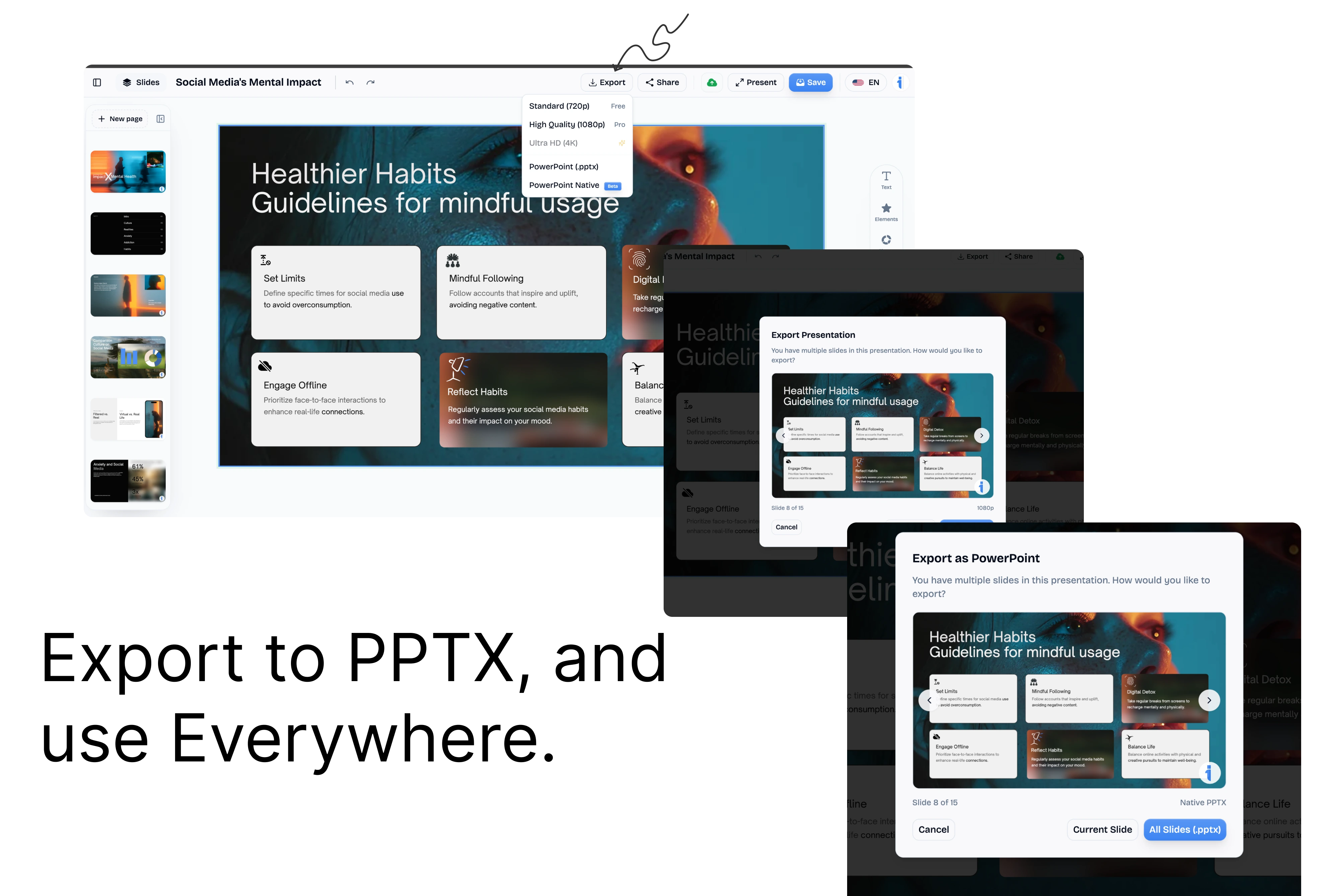
Preview your deck, apply a custom template, and export it as PDF, PPTX, or share it online.
The final verdict: Choose Kleo if you primarily need personal brand inspiration, LinkedIn content ideas, and creator-focused workflows. Choose InfoBlog if you need an AI content repurposing engine that converts long-form content into visual carousels and presentations, with editing and export built into the workflow.
Frequently Asked Questions
Is InfoBlog better than Kleo for LinkedIn carousels?
InfoBlog is better when you want to convert existing content into editable carousel slides. Kleo is better when your priority is personal brand inspiration, LinkedIn content ideas, and creator-focused workflows.
Can Kleo turn blogs or PDFs into carousels?
Kleo is not primarily positioned as a full blog/PDF/report-to-carousel converter. InfoBlog is built around that source-to-visual workflow.
Should I use InfoBlog or Kleo?
Use Kleo if you need personal brand inspiration, LinkedIn content ideas, and creator-focused workflows. Use InfoBlog if you want to convert long-form content into LinkedIn carousels, Instagram carousels, and presentations without manually rebuilding the structure.
Why choose InfoBlog?
The superior alternative built specifically for marketers, creators, and professionals who need powerful content repurposing.
AI Presentation Generation
Instantly turn any blog or document into a professional, ready-to-present deck.
Social Carousel Engine
Generate dynamic, high-engagement LinkedIn and Twitter carousels with a single click.
Smart Templates
18+ content-adaptive templates that automatically format to fit your unique content structure.
Brand Kit Integration
Automatically apply your company's custom fonts, colors, and logos to every generated design.
No Rigid Layouts
Enjoy total editing freedom. Unlike Gamma's constrained themes, customize any element effortlessly.
Blazing Fast Export
Export your final designs directly to PDF or PowerPoint in seconds, without watermarks.