Translate PowerPoint with AI Online for Free
Upload your .pptx deck, choose a target language, and download a translated PowerPoint file. Our AI translates slide text and speaker notes while keeping your original layout, images, and design intact.


Drag & drop your file here
or click to browse
AI PowerPoint GeneratorNeed a presentation without starting from scratch?
Instead of staring at a blank slide for hours, let our AI generate a full, beautifully formatted PowerPoint deck for you in seconds.
How to translate PowerPoint with AI in 3 steps
Three simple steps to get your result instantly.
Upload Document
Upload your PowerPoint (.pptx) file. Processed locally in your browser for 100% privacy.
Translate
Select source and target languages. Our engine instantly analyzes and optimizes your document.
Download Result
Download your translated .pptx presentation. Get your results instantly with no watermarks.
How to translate PowerPoint with AI
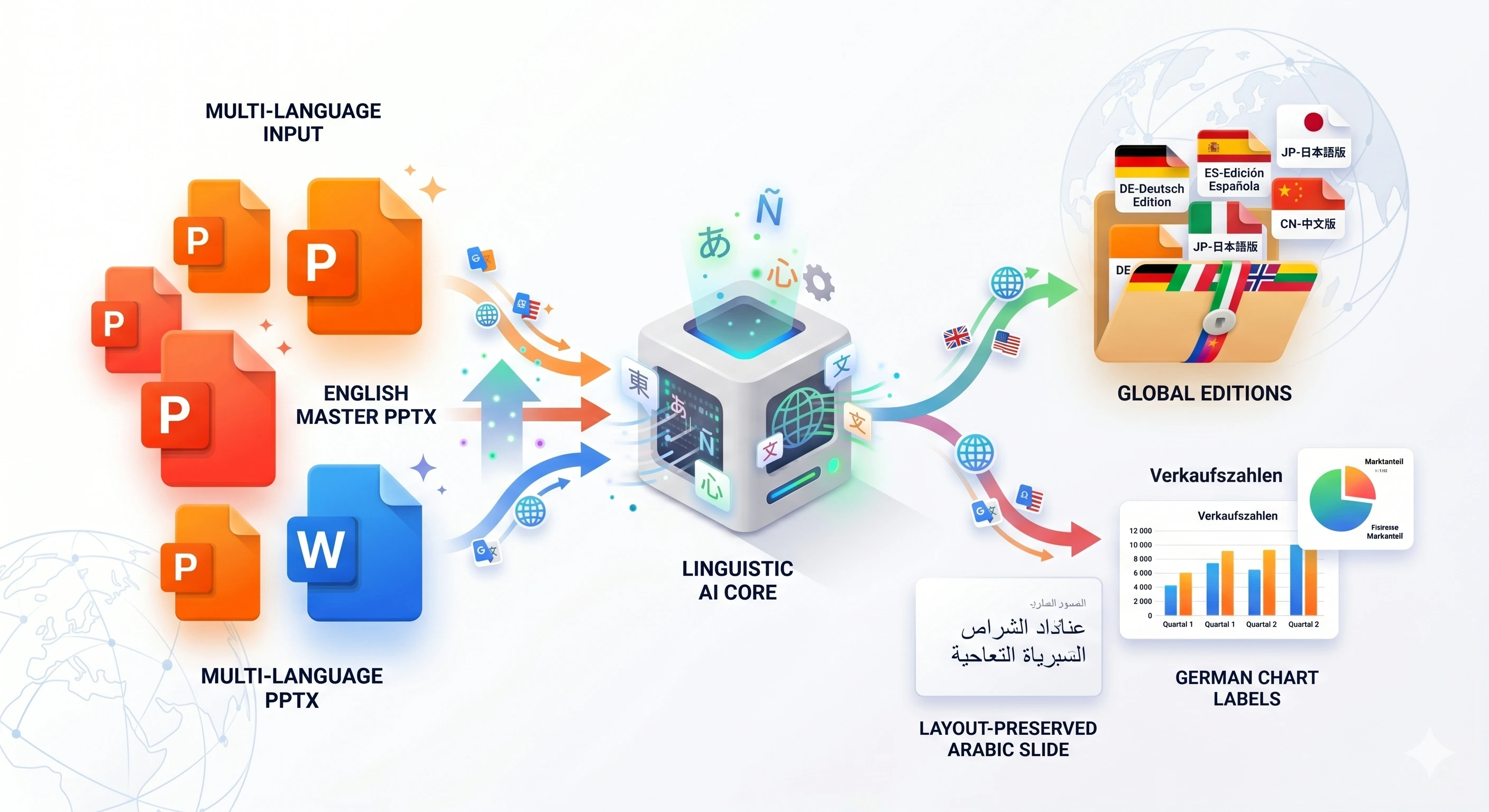
Localizing a presentation shouldn't mean rebuilding every slide from scratch. Our AI PowerPoint Translator reads the text inside your .pptx file — slide content and speaker notes — translates it professionally, and writes the translated text back into the same deck.
The conversion runs in your browser for file parsing, with AI translation handled securely on our server. Your slide masters, images, charts, and positioning stay untouched; only the text changes. Choose from 25+ languages with optional source-language auto-detection. No account required.
Top Use Cases for our Translate PowerPoint with AI tool
Event Localization
Prepare your keynote deck for an international conference in the audience's native language.
Multilingual E-Learning
Generate translated versions of training slide decks for teams across different countries.
Client Reporting
Send monthly reports to overseas clients in a language they can read comfortably.
Who is our Translate PowerPoint with AI tool for?
Instantly localize a master pitch deck into Spanish, Mandarin, or French for international prospects.
Processing Engine Stats
Secure and rapid ai operations
Our highly optimized ai engine processes your presentations locally or through secure edge nodes. Enjoy perfect accuracy without compromising on speed or privacy.
<12s
Avg. processing time
96%
Layout accuracy
355+
Pages supported
17K+
Files processed
See why users choose us to translate PowerPoint with AI
 InfoBlog
Why use our tool to translate PowerPoint with AI?
Translates into 25+ languages using neural AI
Preserves slide layouts, fonts, and images
Translates speaker notes
Files are automatically deleted after processing.

Returns an editable .pptx file
No hidden subscriptions
No login required
Start processing your files immediately. We've removed all friction so you can get your work done faster.
Universal Access
Works beautifully on any device or operating system.
Frequently Asked Questions about Translate PowerPoint with AI
Does the translation break my slide layout?
We replace text in-place inside the original .pptx structure. Layout, images, and shapes are preserved. Very long translations may require minor manual text-box adjustments in PowerPoint.
Are speaker notes translated?
Yes. Both visible slide text and speaker notes are translated when present.
Is my file uploaded to a server?
The .pptx is parsed locally in your browser. Only extracted text is sent for AI translation.
Is Translate PowerPoint with AI secure to use?
Yes, absolutely. We prioritize your privacy and security. Any files uploaded for processing are automatically and permanently deleted from our servers shortly after your session ends. We do not store, share, or analyze your personal documents.
Do I need to download or install any software to use this tool?
No, Translate PowerPoint with AI is entirely cloud-based. You can access and use all of its features directly from your web browser on any device, without needing to install complicated software or browser extensions.
Can I use Translate PowerPoint with AI on my mobile phone or tablet?
Yes! Our platform is fully responsive and optimized for mobile devices. Whether you are on an iPhone, iPad, or Android device, you can use the tool seamlessly on the go.
Is there a limit on the file size I can upload?
Currently, we support processing files up to 100MB in size. This accommodates the vast majority of standard presentations and documents. If your file is larger, we recommend compressing it before using the tool.
