Convert Word to SCORM Online for Free
Upload your Word training document and instantly generate a SCORM 1.2 package your LMS can import. Each major section becomes a course module with prev/next navigation.

Drag & drop your file here
or click to browse
AI PowerPoint GeneratorNeed a presentation without starting from scratch?
Instead of staring at a blank slide for hours, let our AI generate a full, beautifully formatted PowerPoint deck for you in seconds.
How to convert Word to SCORM in 3 steps
Three simple steps to get your result instantly.
Upload Document
Upload your Word (.docx) document. Processed locally in your browser for 100% privacy.
Convert
We convert each section into an HTML course module. Our engine instantly analyzes and optimizes your document.
Download Result
Download your SCORM .zip package. Get your results instantly with no watermarks.
How to convert Word to SCORM
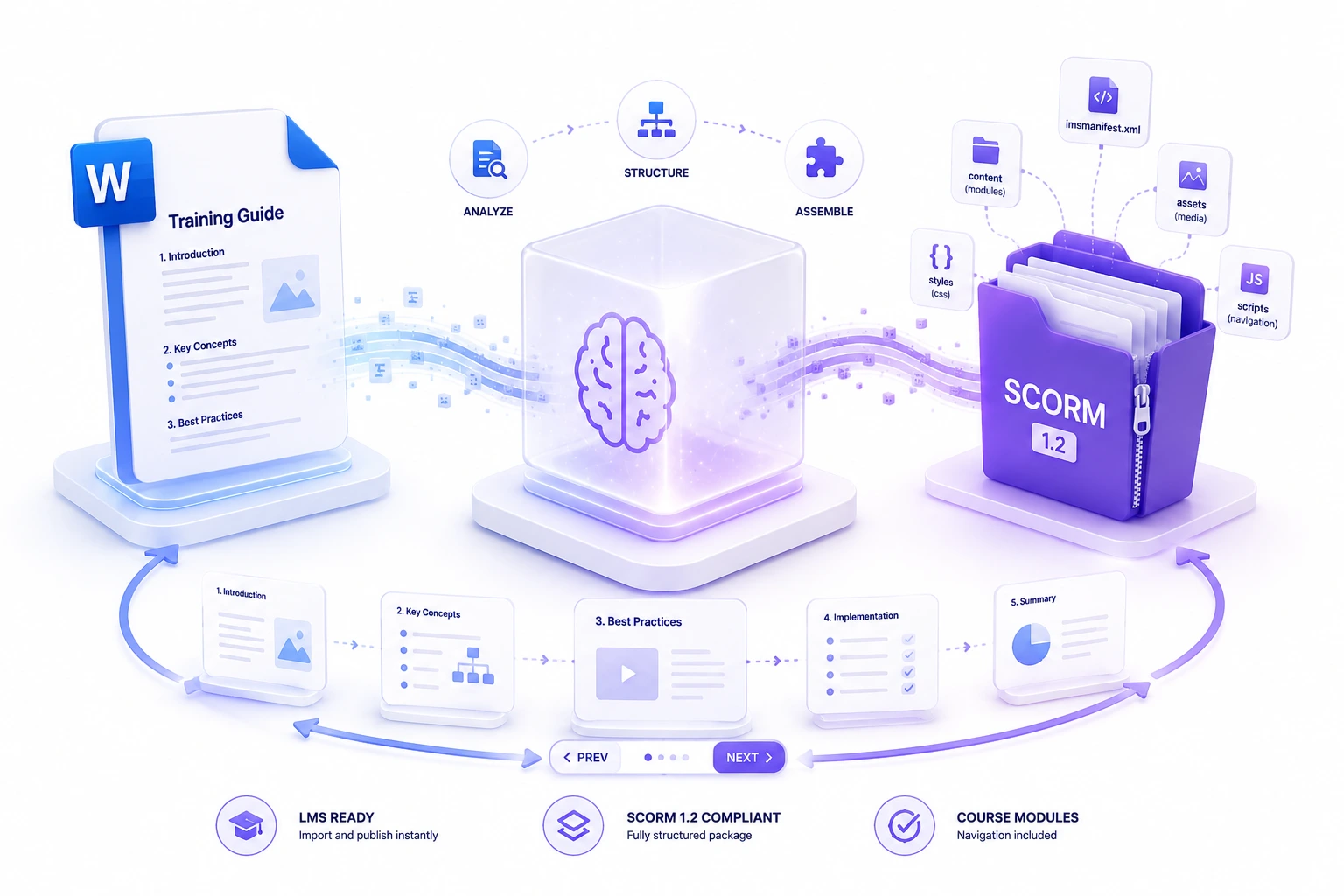
Many training teams still author content in Microsoft Word — but LMS platforms need SCORM packages to host and track learning. Rebuilding a Word manual inside an authoring tool takes hours. Our converter reads your .docx in the browser, splits it into course sections by headings, preserves embedded images, generates HTML pages, writes a valid imsmanifest.xml, and bundles everything into a downloadable SCORM .zip.
The conversion runs entirely locally. We parse the document structure, map headings and lists into course modules, and package the output for Moodle, TalentLMS, LearnUpon, and similar systems.
Top Use Cases for our Word to SCORM converter
LMS Publishing
Upload a Word employee handbook or training guide as a SCORM course.
Compliance Training
Convert mandatory policy documents into LMS modules for completion tracking.
Legacy Content Migration
Move archived Word training materials into a modern LMS quickly.
Who is our Word to SCORM converter for?
Turn existing Word training manuals into LMS-ready SCORM modules without manual rebuild.
Processing Engine Stats
Lightning-fast conversion for massive documents
Our highly optimized convert engine processes your documents locally or through secure edge nodes. Enjoy perfect accuracy without compromising on speed or privacy.
<12s
Avg. processing time
98%
Layout accuracy
534+
Pages supported
26K+
Files processed
See why users choose us to convert Word to SCORM
 InfoBlog
Why use our Word to SCORM converter?
Heading-based section splitting
Preserves lists and embedded images
Generates valid imsmanifest.xml
Files are automatically deleted after processing.

Prev/next navigation between modules
No hidden subscriptions
Runs entirely in your browser
Start processing your files immediately. We've removed all friction so you can get your work done faster.
Universal Access
Works beautifully on any device or operating system.
Frequently Asked Questions about Convert Word to SCORM
Does this work with .doc files?
No. This tool supports modern .docx files. Older .doc binary files require conversion to .docx first.
How are sections determined?
We split your document at Heading 1 styles and page breaks. Long documents without headings are split into readable chunks automatically.
Is my document uploaded to a server?
No. The entire conversion happens locally in your browser.
Is Convert Word to SCORM secure to use?
Yes, absolutely. We prioritize your privacy and security. Any files uploaded for processing are automatically and permanently deleted from our servers shortly after your session ends. We do not store, share, or analyze your personal documents.
Do I need to download or install any software to use this tool?
No, Convert Word to SCORM is entirely cloud-based. You can access and use all of its features directly from your web browser on any device, without needing to install complicated software or browser extensions.
Can I use Convert Word to SCORM on my mobile phone or tablet?
Yes! Our platform is fully responsive and optimized for mobile devices. Whether you are on an iPhone, iPad, or Android device, you can use the tool seamlessly on the go.
Is there a limit on the file size I can upload?
Currently, we support processing files up to 200MB in size. This accommodates the vast majority of standard presentations and documents. If your file is larger, we recommend compressing it before using the tool.
